How to install Forge in Prism Launcher


Asif Mohammad Sovon
Asif Mohammad Sovon, IT Assistant at Bangladesh Air Force and Fileion tech writer, simplifies tech t...
You have Prism Launcher ready. You have a list of mods you want to try. But there is one thing standing between you and a fully modded Minecraft experience: Forge is not installed yet.
This is one of the most common roadblocks for new Minecraft players stepping into modding. Forge is the backbone of thousands of popular mods. Without it, most mod files simply will not load. While Prism Launcher makes the process much easier than older methods, first-time users still get confused about where to start.
This guide covers exactly what you need to do. You will learn what Forge is, why Prism Launcher is the better choice for managing it, and how to install Forge correctly from scratch in just a few steps.
Let's dive into the basics before moving to the hands-on steps.
What is Forge in Prism Launcher?
Forge, or Minecraft Forge, is a free and open-source mod loader and API for Minecraft as Java Edition. It acts as a bridge between the base game and the mods you want to add. Most community-made mods are built specifically for Forge, which makes it the most widely used modding platform in the Minecraft ecosystem.
Prism Launcher is a free, open-source Minecraft launcher that lets you create and manage multiple Minecraft instances. Each instance can run a different version of the game with its own mod loader, settings, and mods. This makes it far more flexible than the default Minecraft launcher.
When you install Forge inside Prism Launcher, you set up a dedicated Minecraft instance that is ready to load Forge-compatible mods. This setup is popular with casual players who want a few extra mods, technical players building complex modpacks, content creators running custom experiences, and developers testing mod compatibility across versions.
Key Features
Prism Launcher keeps each modded setup in its own isolated instance. You can have Forge 1.20.1 in one instance and Fabric 1.19.4 in another without any conflicts.
You do not need to download Forge separately from the official site. Prism Launcher includes a built-in mod loader selector that fetches and installs Forge automatically during instance creation.
Prism Launcher supports Forge across dozens of Minecraft versions. You can install Forge for older versions, such as 1.7.10, or for the latest stable releases with equal ease.
Once Forge is installed in your instance, Prism Launcher lets you browse and install mods directly from Modrinth and CurseForge from within the launcher itself.
Step-by-Step Guide: How to Install Forge in Prism Launcher
-
Download Prism Launcher from Fileion. Choose the correct installer for your operating system, whether that is Windows, macOS, or Linux. Run the installer and complete the setup process.
-
Open Prism Launcher after installation. On your first launch, the launcher will ask you to set up a Java runtime. Let it detect your installed Java version automatically, or install the recommended version it suggests. This step is required before you can create any instance.
-
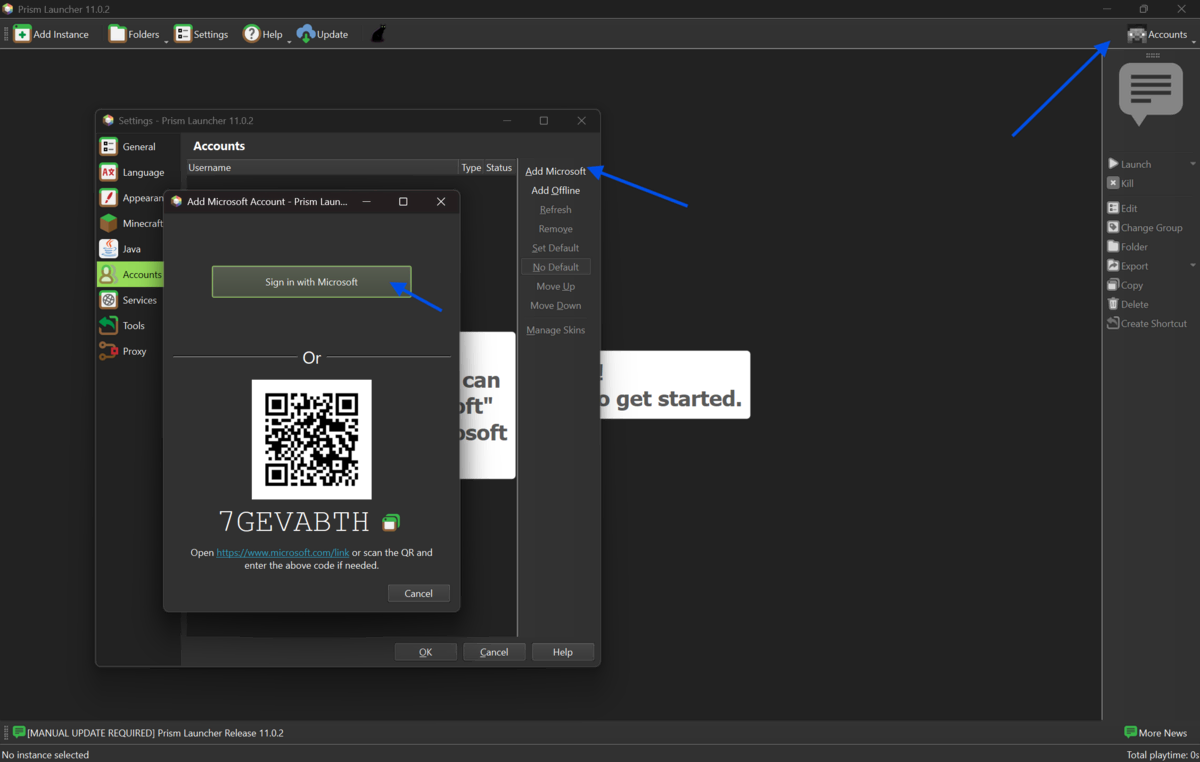
Log in to your Minecraft account. Click the profile icon or the accounts menu in the top right corner. Add your Microsoft account and complete the login process. You need a valid Minecraft: Java Edition license to proceed.
-
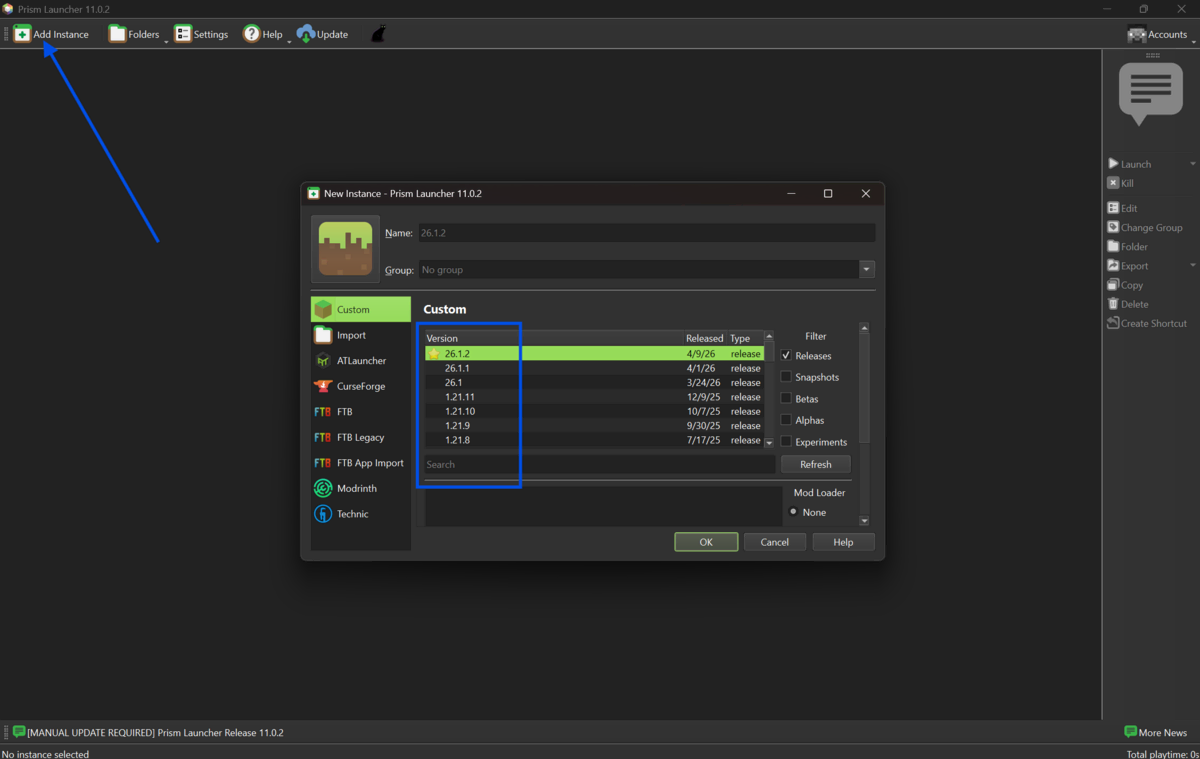
Click the "Add Instance" button located in the top left area of the launcher interface. This opens the new instance creation window, where you configure everything from the Minecraft version to the mod loader.
-
Select your desired Minecraft version from the version list on the left side of the instance window. If you are installing Forge to use a specific modpack or mod collection, check that mod's required Minecraft version first. Using the wrong version will cause mods to fail.
-
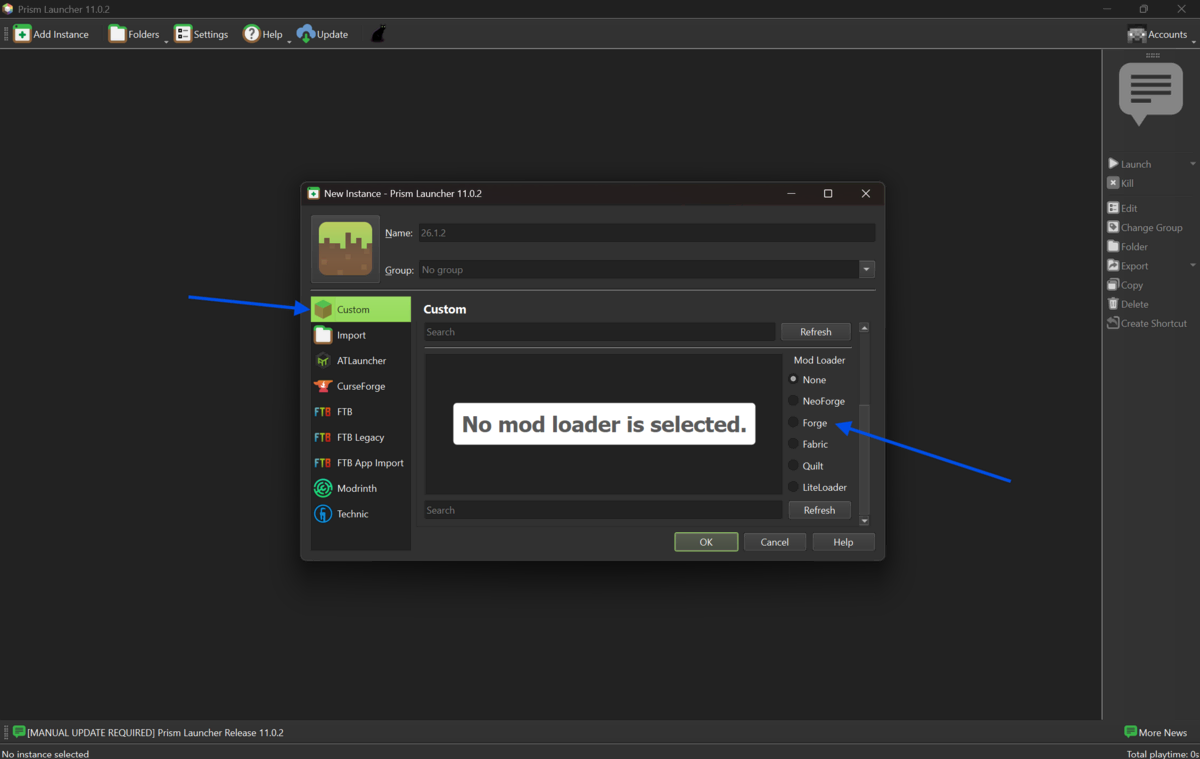
On the right side of the instance creation window, look for the mod loader section. You will see options including Vanilla, Forge, Fabric, Quilt, and NeoForge. Click on "Forge" to select it as your mod loader.
-
A list of available Forge versions will appear below the mod loader selection. The list is sorted from newest to oldest. If you have a specific version requirement from your mods, select that version. If not, choose the latest recommended Forge version for your selected Minecraft version.
-
Give your instance a recognizable name in the "Name" field at the top of the window. A name like "Forge 1.20.1" or "My Mod Setup" helps you stay organized, especially if you plan to create multiple instances later.
-
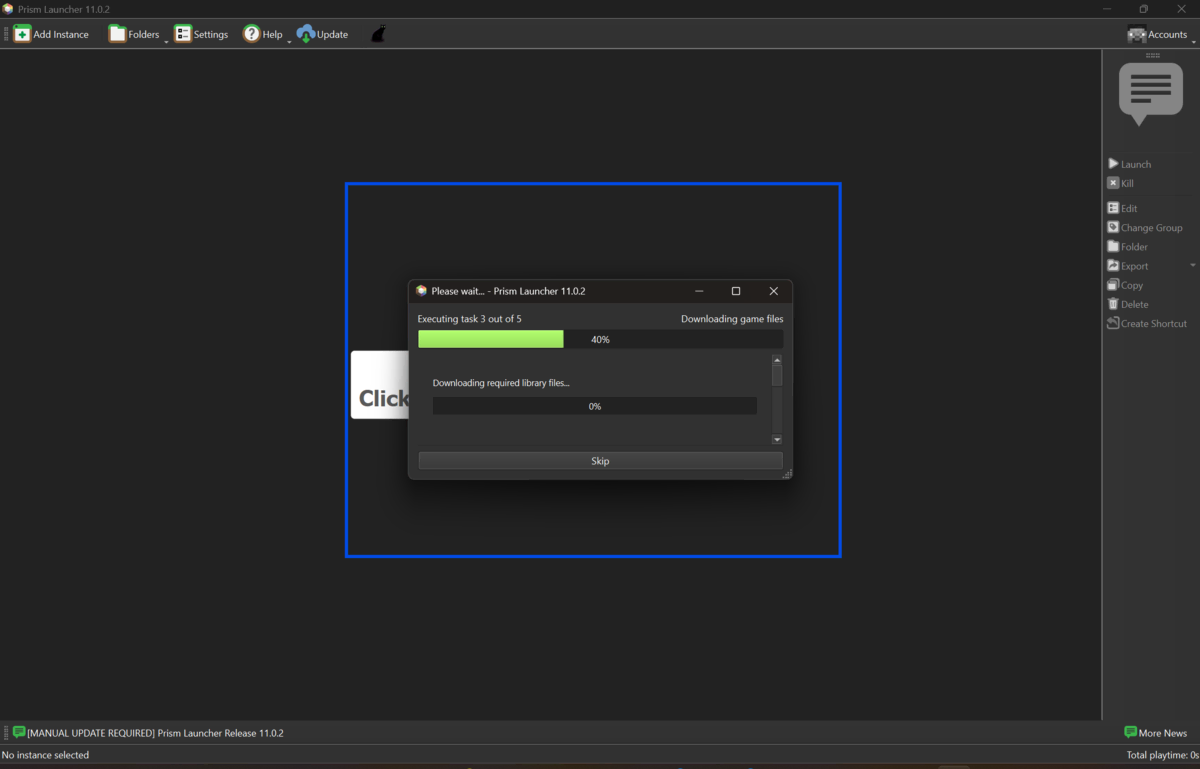
Click "OK" to confirm. Prism Launcher will now download and install Minecraft along with the Forge mod loader automatically. This process requires an active internet connection and may take a minute or two, depending on your speed.
-
You will see a progress bar or a log window showing the installation status. Do not close the launcher during this step. Once complete, the new instance will appear on your main screen.
-
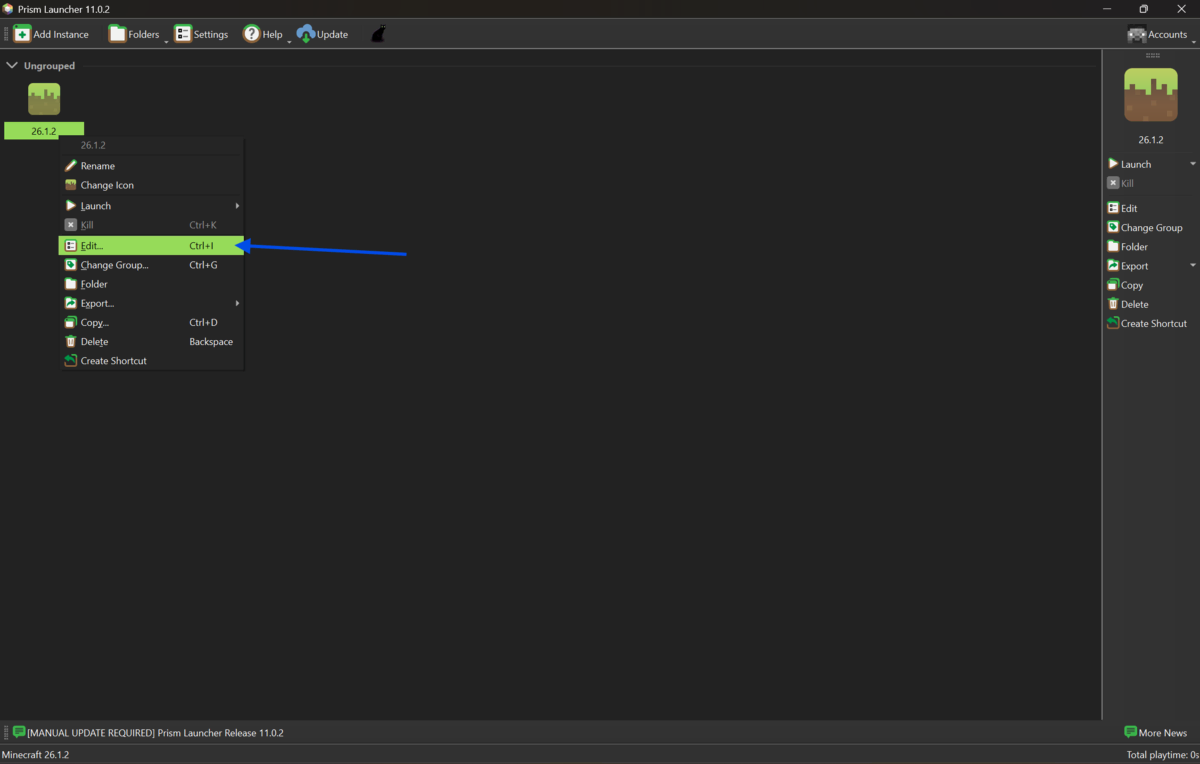
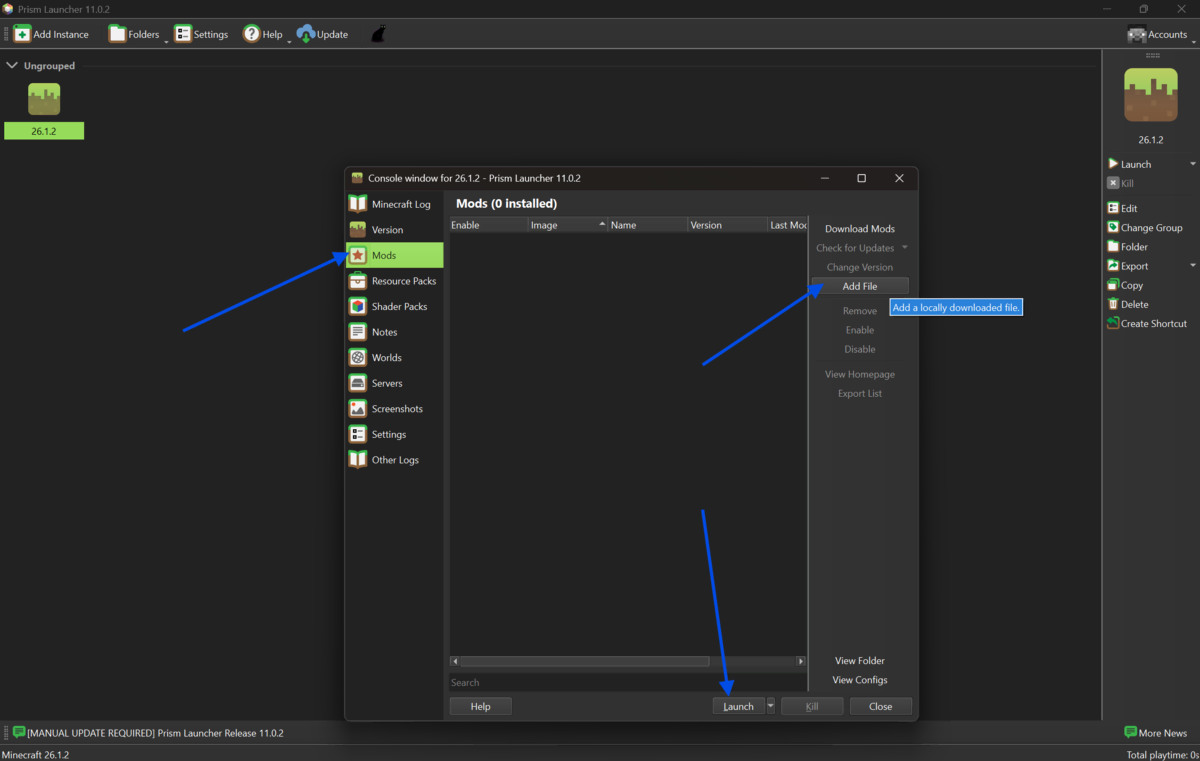
Right-click your new Forge instance and select "Edit" to open the instance settings. Navigate to the "Mods" tab. From here, you can add mods manually by clicking "Add File" and selecting a downloaded .jar mod file, or click "Download Mods" to browse Modrinth or CurseForge directly.
-
Click "Launch" to start the instance. Minecraft will open with the Forge mod loader active. You will see the Forge loading screen during startup. If mods are installed correctly, they will appear in the in-game mod list under Options. Your modded Minecraft setup is now fully ready.
Quick Tips
-
Always match your mod version to your Forge version and Minecraft version. A mismatch is the number one cause of crashes on startup.
-
Allocate enough RAM to your instance. For small mod packs, 4 GB is usually enough. For larger ones, 6 to 8 GB is better. Go to Edit Instance, then Settings, then Java, and adjust the maximum memory value.
-
When adding mods manually, always place .jar files inside the mods folder of your instance. You can reach this folder by right-clicking the instance and selecting "Open .minecraft Folder."
-
If a mod requires a dependency like JEI or Geckolib, install that dependency mod as well. Missing dependencies are a very common cause of loading errors.
-
Use the built-in CurseForge or Modrinth browser inside Prism Launcher to install mods safely. Avoid downloading mods from unofficial third-party sites to reduce the risk of corrupted or harmful files.
Common Mistakes to Avoid
-
This happens when players select a Minecraft version without checking what their mods actually require. Always verify the required version from the mod's description page before creating your instance.
-
Prism Launcher needs a properly configured Java runtime to run Minecraft. Skipping or ignoring the Java setup prompt leads to launch failures. Use the built-in Java auto-detect feature or install the version recommended by the launcher.
-
Forge mods will not run on a Fabric instance and vice versa. These are two entirely separate mod ecosystems. Make sure every mod in your list is labeled as compatible with Forge.
-
Adding 40 mods at once and then troubleshooting crashes is frustrating and time-consuming. Add mods in small batches and test launches between each batch to isolate any problems.
Pricing and Availability
Prism Launcher is completely free and open-source. There are no paid tiers, subscriptions, or paywalls. It is available for Windows, macOS, and Linux.
Minecraft Forge is also free. With Prism Launcher, you do not need to visit that site at all, since the launcher installs Forge automatically.
You do need a paid Minecraft: Java Edition license to play. A one-time purchase grants lifetime access. The price of the Standard Edition is $29.99 & Deluxe Collection is $39.99.
Final Verdict
Prism Launcher makes installing Forge as precise as it can be. The built-in mod loader selector removes the need for manual Forge installation, and the instance system keeps everything organized, no matter how many setups you manage.
If you are new to Minecraft modding, this is the right place to start. If you are an experienced player switching from the default launcher or MultiMC, the transition is easy, and the benefits are immediate.
The combination of Prism Launcher and Forge gives you access to one of the largest mod ecosystems in gaming history. Whether you want survival overhauls, technical machinery, magic systems, or performance improvements, Forge is the foundation that makes all of it possible.
Download Prism Launcher from our site today, follow the steps in this guide, and get your modded Minecraft world running in under ten minutes.
FAQs
Is Prism Launcher safe to use?
Yes. Prism Launcher is a free, open-source project with publicly available source code. It is maintained by an active community and regularly reviewed for security. Download it only from the official site or from our verified download page.
Can I install multiple Forge versions at the same time in Prism Launcher?
Yes. Each Prism Launcher instance is fully independent. You can have Forge 1.12.2 in one instance, Forge 1.20.1 in another, and Forge 1.16.5 in a third, all running separately without interfering with each other.
What Java version does Prism Launcher need for Forge?
It depends on the Minecraft version. Minecraft 1.17 and newer require Java 17 or higher. Older versions like 1.16.5 and below typically use Java 8. Prism Launcher can manage multiple Java installations and will recommend the correct one for each instance.
Why does my Forge instance crash on startup?
The most common reasons are a missing mod dependency, a version mismatch between the mod and Forge, or insufficient RAM allocated to the instance. Check the crash log inside the instance's logs folder, look for the error message, and search for that specific mod conflict or missing file.
Can I import an existing Forge modpack into Prism Launcher?
Yes. Prism Launcher supports importing modpacks from CurseForge, Modrinth, and MultiMC-format zip files. Click "Add Instance," then choose the "Import" tab, and select your modpack file or paste a link. The launcher will set up the instance automatically with all included mods and the correct Forge version.
Comments
Let us know about your thoughts
Explore more articles related to Prism Launcher
Here you will find all the latest tips and tricks about Prism Launcher. Also you will get many solution of problems which you may face while using this app.

Your Mods, Your Rules
Prism Launcher is the ultimate tool for modded Minecraft. Fully open-source and ad-free, it lets you manage multiple versions, modpacks, and Java settings with ease. Lightweight yet powerful, Prism keeps each instance separate, preventing crashes and giving players full control over their worlds.